
Part of the guide: The Site Inspection Checklist to Run on Every Walkthrough
Every checklist below is a real walk: areas in the order you move through a building, one check per line, and the trade a Fail is filed under. They exist in two forms. Each page prints cleanly. Each also downloads as a small file that opens in Punch List AI, where you tap Pass, Fail or N/A, a Fail becomes a numbered item with a photo, and the whole walk prints as an appendix to the report.
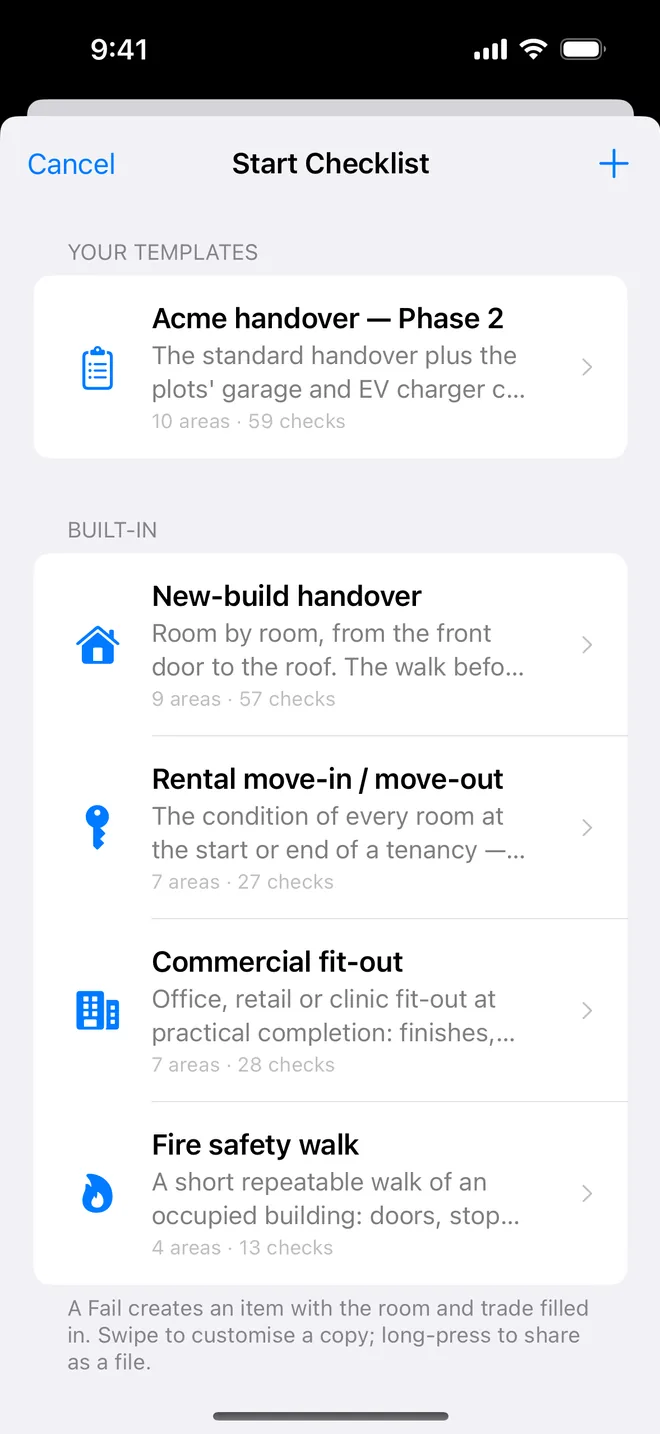
Fourteen templates, 384 checks. The first four are built into the app; the other ten are on this site to download. Use them as they are, or copy one in the app and edit it to your own practice.
New-build handover checklist

The one most people mean by 'snagging list'. Nine areas from the front door to the roof space, written to match the defects in the field guide. Walk it before the keys; walk it again to close.
Who uses it: Snagging inspectors, buyers of new homes, site managers before handover.
Areas: Entrance & hallway, Living room, Kitchen, Bathroom & WC, Bedrooms, Stairs & landing, Utility & services, Exterior & garden, Roof & gutters.
Get it: print or download the new-build handover checklist
(57 checks) · built into the app.
Rental move-in / move-out checklist

The condition of every room at the start or end of a tenancy. Photograph rooms that pass as well as rooms that fail; the dated record is the deposit conversation.
Who uses it: Letting agents, landlords, property managers, tenants who want a fair deposit.
Areas: Entrance, Living room, Kitchen, Bathroom, Bedrooms, Safety, Exterior.
Get it: print or download the rental move-in / move-out checklist
(27 checks) · built into the app.
Commercial fit-out checklist

Office, retail or clinic fit-out: finishes, services, doors, data and the statutory items the landlord's agent will ask for. Twenty-eight checks in seven areas.
Who uses it: Project managers, tenants' agents, landlords' surveyors at practical completion.
Areas: Reception & entrance, Open-plan areas, Meeting rooms, WCs & showers, Kitchenette, Services & plant, Fire & life safety.
Get it: print or download the commercial fit-out checklist
(28 checks) · built into the app.
Fire safety walk checklist

Short and repeatable: doors, stopping, signage, extinguishers, escape routes. Thirteen checks, once a month, and the appendix on the report is your log.
Who uses it: Facilities managers, responsible persons, block managers.
Areas: Fire doors, Compartmentation, Escape routes, Equipment.
Get it: print or download the fire safety walk checklist
(13 checks) · built into the app.
Bathroom snagging checklist

Fitting by fitting, then the joints, then the drainage, then the things you only see with water running. The room where most call-backs start.
Who uses it: Snaggers, home inspectors, anyone closing a refurbishment.
Areas: Sanitaryware, Tiling and grout, Sealant and waterproofing, Drainage, Ventilation and electrics, Doors, walls and finishes.
Get it: print or download the bathroom snagging checklist
(28 checks) · import into the app.
Kitchen snagging checklist

Units, worktops, appliances, sink, electrics, splashback, floor. Run every appliance and every tap during the walk.
Who uses it: Snaggers, kitchen fitters' clients, property managers at turnover.
Areas: Units and worktops, Appliances, Sink and plumbing, Electrical, Splashback, walls and ceiling, Floor.
Get it: print or download the kitchen snagging checklist
(26 checks) · import into the app.
Pre-drywall inspection checklist

The inspection you cannot redo. Framing, rough plumbing and electrical, HVAC, insulation, flashing and fire blocking before the boards go on.
Who uses it: US and Canadian home buyers, builders' QA, inspectors.
Areas: Framing, Rough plumbing, Rough electrical, HVAC rough-in, Insulation and air sealing, Windows, doors and flashing, Fire blocking and draft stops.
Get it: print or download the pre-drywall inspection checklist
(31 checks) · import into the app.
Final walkthrough: new home checklist

Exterior, every room, kitchen, baths, mechanical and garage. Run everything, open everything, and hand the builder's warranty department a numbered list.
Who uses it: US home buyers and their inspectors before closing.
Areas: Exterior, Entry and living areas, Kitchen, Bathrooms, Bedrooms and closets, Mechanical and utility, Garage.
Get it: print or download the final walkthrough: new home checklist
(34 checks) · import into the app.
Roof and rainwater checklist

Covering, flashings, ridges and verges, gutters and downpipes, then the roof space from inside. Where most water damage starts.
Who uses it: Surveyors, property managers, buyers of older houses.
Areas: Covering, Flashings and penetrations, Ridges, hips and verges, Gutters and downpipes, Roof space from inside.
Get it: print or download the roof and rainwater checklist
(21 checks) · import into the app.
External walls, windows and drainage checklist

Walls, openings, damp-proofing and ground levels, drainage and boundaries. Walk it twice: close to the wall, then from the boundary.
Who uses it: Snaggers, surveyors, anyone with a damp problem to chase.
Areas: Walls, Windows and external doors, Damp-proofing and ground levels, Surface water and drainage, Boundaries and externals.
Get it: print or download the external walls, windows and drainage checklist
(23 checks) · import into the app.
Electrical final fix checklist

Consumer unit, accessories, lighting, wet-room zones, safety devices, certification. Test, do not look.
Who uses it: Electricians' clients, site managers, snaggers who carry a socket tester.
Areas: Consumer unit, Sockets and switches, Lighting, Bathroom and kitchen, Safety devices, Certification and handover.
Get it: print or download the electrical final fix checklist
(25 checks) · import into the app.
Landlord periodic inspection checklist

Safety, damp and ventilation, kitchen, bathroom, rooms, exterior. Same walk every visit; a dated PDF each time.
Who uses it: Landlords and agents inspecting quarterly or twice a year.
Areas: Safety, Damp, mould and ventilation, Kitchen, Bathroom, Living areas and bedrooms, Exterior and common parts.
Get it: print or download the landlord periodic inspection checklist
(23 checks) · import into the app.
Hotel room snagging checklist

A guest room and its bathroom at practical completion. Identical every room; name the project after the floor.
Who uses it: Hotel project teams, FF&E managers, operators at handover.
Areas: Entry and wardrobe, Bedroom, Bathroom, Lighting and electrical, HVAC and acoustics, Finishes.
Get it: print or download the hotel room snagging checklist
(27 checks) · import into the app.
First-fix inspection checklist

Before plasterboard: structure and openings, first-fix plumbing and electrics, insulation, fire stopping, ventilation. Photograph the stopping before it is covered.
Who uses it: UK site managers, clerks of works, self-builders.
Areas: Structure and openings, First-fix plumbing, First-fix electrical, Insulation and vapour control, Fire stopping, Ventilation.
Get it: print or download the first-fix inspection checklist
(21 checks) · import into the app.
How to import a template into the app
- On the iPhone or iPad, open the template page and tap Download for the app. Safari saves a
.punchlist-template.jsonfile. - Open it from Files, or in the app open the template picker, tap + and Import.
- It appears under Your templates. Start it on any project.
Made a better one? Long-press any template in the app to share it as the same kind of file. Send it to us and, if it is good, it goes on this page with your name on it.
Questions people ask
Are the templates really free?
Yes. Print them, download them, edit them in the app. The app itself is free for one project; checklists are on the free plan.
Can I edit a template?
In the app, swipe any template to customise a copy: rename areas, add or remove checks, change the trade. You can also add a check during a walk and save the walk as a new template.
What format is the download?
A small JSON file with the app's format tag. It is readable in any text editor if you want to see the checks, and the app refuses anything that is not a Punch List AI template with a clear message.
Which one should I use for a new house in the UK?
New-build handover, then Bathroom snagging and Kitchen snagging if you want the wet rooms in more depth. Together that is 111 checks; the room-by-room article walks all of them.