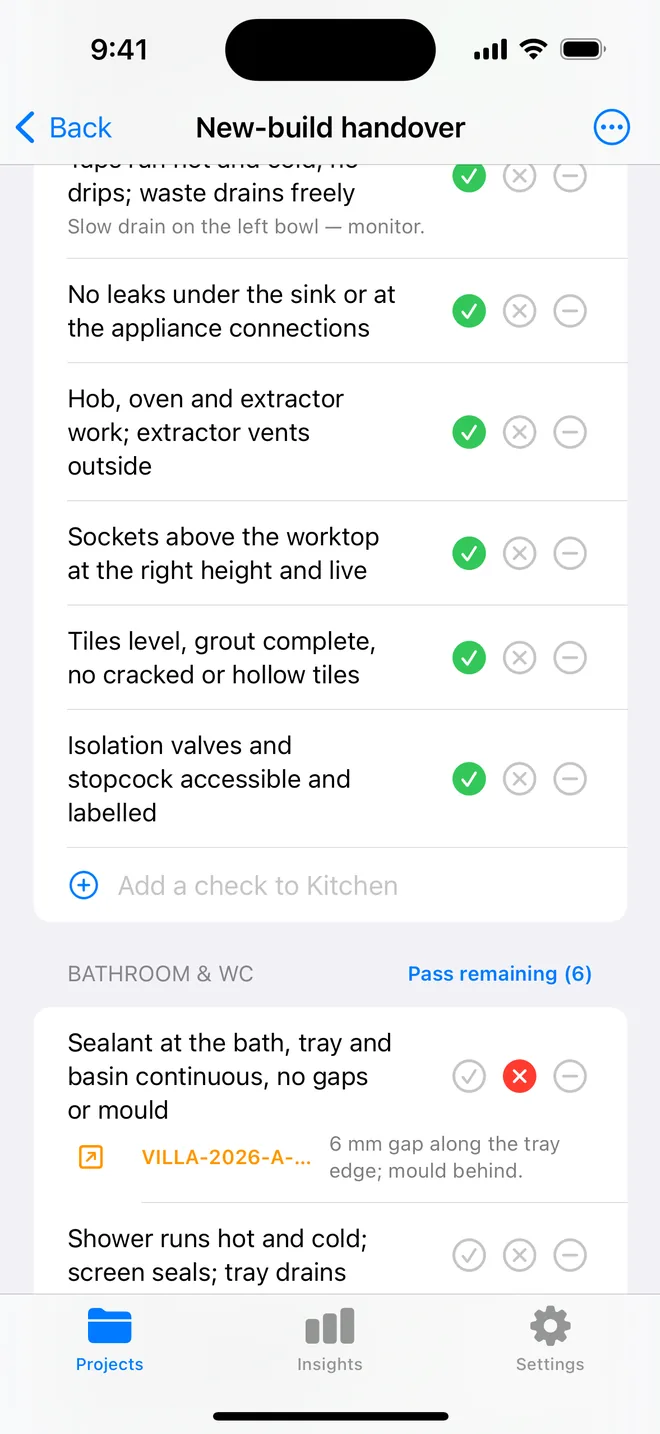
How the walk works in the app
- Download the file above on your iPhone or iPad and open it; it appears under Your templates.
- Walk the areas in order. Tap Pass, Fail or N/A.
- A Fail creates an item with the area and trade filled in; take the photo and the AI drafts the description and severity.
- Add a check on the spot if the list forgot one. Save the walk as your own template.
- The report's appendix prints every check and its result.
The checklist
Trade in grey is what a Fail is filed under. Print this page or tick on screen.
Entry and wardrobe 4
- Door closer, lock, latch and viewer work; fire rating label presentSafety
- Card reader or lock commissioned; DND/MUR indicator worksElectrical
- Wardrobe doors aligned; rail, hangers, safe and iron fittedFinishing
- Luggage rack and mirror secureFinishing
Bedroom 6
- Bed frame, headboard and bedside units secure and levelFinishing
- Bedside controls: lights, sockets, USB, master switch all functionElectrical
- TV mounted level, powered, channels tuned; remote presentElectrical
- Curtains and blackout run freely, meet in the middle, track secureFinishing
- Desk, chair, minibar and tea station complete and workingOther
- Carpet or floor seams invisible; skirting tightCosmetic
Bathroom 6
- Shower drains, no pooling, screen sealsPlumbing
- WC, basin, taps and accessories secure; no dripsPlumbing
- Sealant and grout complete; tiles matched and flatFinishing
- Mirror demister, shaver socket and hairdryer workElectrical
- Towel rail heats; extract runs with overrunMechanical
- Hooks, holders and shelves at drawn positionsFinishing
Lighting and electrical 4
- All scenes and switches work as the schedule describesElectrical
- No flicker on dimming; matching lamp colour throughoutElectrical
- Emergency light and exit signage in the corridor testedSafety
- Sockets at desk and bedside live; international adaptors if specifiedElectrical
HVAC and acoustics 3
- Fan coil or AC heats and cools; thermostat responds; no noise or rattleMechanical
- Grilles clean, straight, no condensation marksMechanical
- Door seals and window acoustics, corridor and street noise acceptableFinishing
Finishes 4
- Paint and wallcovering free of marks, joints invisibleCosmetic
- Joinery and stone free of chips and scratchesCosmetic
- Artwork, signage and room number fittedCosmetic
- Room cleaned to handover standardOther
Questions
How do I use the hotel room snagging checklist in the app?
Download the file below on your iPhone or iPad and open it, it lands in the template picker. Then open a project, tap Start next to Checklists and choose it. Tap Pass, Fail or N/A per check; a Fail creates an item with the area and trade filled in.
Can I change the checks?
Yes. In the app, swipe the template to customise a copy: rename areas, add or remove checks, change the trade. You can also add a check during a walk and save the walk as a new template.
Does the walk print on the report?
Yes. The PDF's checklist appendix lists each area, each check, its result and the item a Fail created.
Walk it on your phone
Free to download; the first project is free for good. Checklists are free.
Download on theApp Store