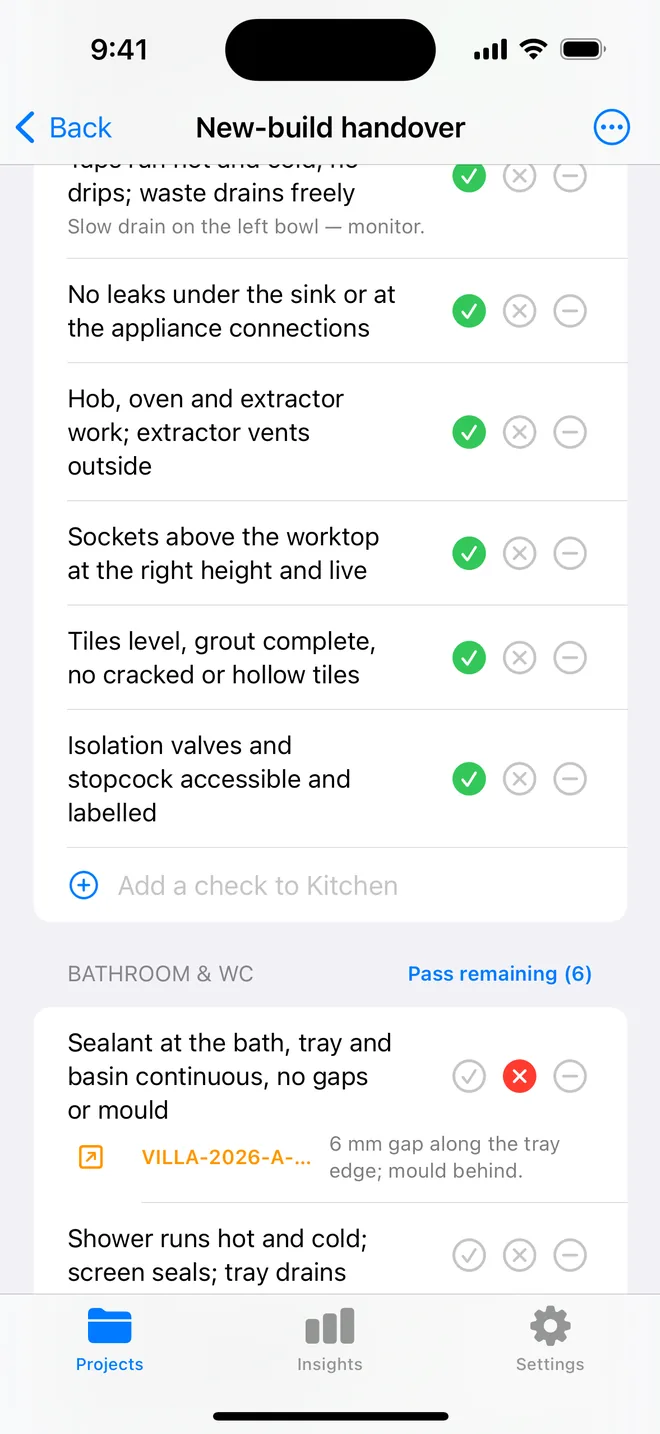
How the walk works in the app
- Open a project, tap Start next to Checklists and pick this walk, it is built in.
- Walk the areas in order. Tap Pass, Fail or N/A.
- A Fail creates an item with the area and trade filled in; take the photo and the AI drafts the description and severity.
- Add a check on the spot if the list forgot one. Save the walk as your own template.
- The report's appendix prints every check and its result.
The checklist
Trade in grey is what a Fail is filed under. Print this page or tick on screen.
Entrance & hallway 7
- Front door closes, locks and seals; no daylight at the frameFinishing
- Door furniture fitted and working; keys suppliedFinishing
- Walls and ceiling: no cracks, nail pops or unfilled holesCosmetic
- Paint finish even; no runs, misses or oversprayCosmetic
- Floor level, no lifting edges or squeaksFinishing
- Light switches and sockets work; faceplates straightElectrical
- Smoke detector fitted and testedSafety
Living room 7
- Windows open, close and lock; trickle vents workFinishing
- Window sealant continuous; no gaps at the revealsFinishing
- No cracks above openings or at wall–ceiling junctionsStructural
- Skirting fitted tight; joints filled and paintedCosmetic
- Sockets, TV and data points as drawn; all liveElectrical
- Radiator heats evenly; valves turn; no leaks at the tailsMechanical
- Floor finish free of scratches, gaps and dentsCosmetic
Kitchen 9
- Cabinet doors and drawers aligned; soft-close worksFinishing
- Worktop joints sealed; no chips or scratchesFinishing
- Sealant continuous behind the sink and along the upstandPlumbing
- Taps run hot and cold; no drips; waste drains freelyPlumbing
- No leaks under the sink or at the appliance connectionsPlumbing
- Hob, oven and extractor work; extractor vents outsideElectrical
- Sockets above the worktop at the right height and liveElectrical
- Tiles level, grout complete, no cracked or hollow tilesFinishing
- Isolation valves and stopcock accessible and labelledPlumbing
Bathroom & WC 7
- Sealant at the bath, tray and basin continuous, no gaps or mouldPlumbing
- Shower runs hot and cold; screen seals; tray drainsPlumbing
- WC flushes and refills; no movement at the panPlumbing
- Grout complete; no cracked tiles, especially at cornersFinishing
- Extractor fan runs and switches off on the timerElectrical
- Towel rail heats; no leaks at the valvesMechanical
- Floor falls to the drain (wet rooms); no pondingPlumbing
Bedrooms 6
- Windows operate; restrictors fitted upstairsSafety
- Walls, ceiling and paint free of defectsCosmetic
- Wardrobe doors and rails fitted and alignedFinishing
- Sockets and light switches as drawn; all liveElectrical
- Radiator heats; TRV fitted and workingMechanical
- Carpet or floor fitted tight to the skirting; no ripplesCosmetic
Stairs & landing 4
- Handrail secure; balustrade gaps under 100 mmSafety
- Treads level and even; no squeaks or movementStructural
- Loft hatch fitted, insulated and closesFinishing
- Smoke and heat detectors fitted where requiredSafety
Utility & services 5
- Boiler commissioned; certificate and manual suppliedMechanical
- Consumer unit labelled; RCD test button worksElectrical
- Electrical installation certificate suppliedElectrical
- Washing machine and dryer connections in place; no leaksPlumbing
- Meters accessible and readableOther
Exterior & garden 7
- Brickwork: no stepped cracking, efflorescence or spallingStructural
- Pointing complete and even; weep holes clearStructural
- Render free of cracking, hollow patches or stainingCosmetic
- Paths and patios level; no trip edges; falls away from the houseStructural
- Fences, gates and boundaries as drawn; gates latchFinishing
- External taps, lights and sockets workElectrical
- Garden graded and cleared of builders' debrisOther
Roof & gutters 5
- Tiles or slates complete; none slipped, cracked or missingStructural
- Ridge and hip fixings secure; verges pointed or dry-fixedStructural
- Flashings at chimneys and abutments dressed and sealedStructural
- Gutters aligned and clipped; downpipes connected; no overflowPlumbing
- Fascia, soffit and vents completeFinishing
Questions
How do I use the new-build handover checklist in the app?
It is built in: open a project, tap Start next to Checklists and choose it. Tap Pass, Fail or N/A per check; a Fail creates an item with the area and trade filled in.
Can I change the checks?
Yes. In the app, swipe the template to customise a copy: rename areas, add or remove checks, change the trade. You can also add a check during a walk and save the walk as a new template.
Does the walk print on the report?
Yes. The PDF's checklist appendix lists each area, each check, its result and the item a Fail created.
Walk it on your phone
Free to download; the first project is free for good. Checklists are free.
Download on theApp Store