Point your camera at a defect.
Get a punch list item in seconds.
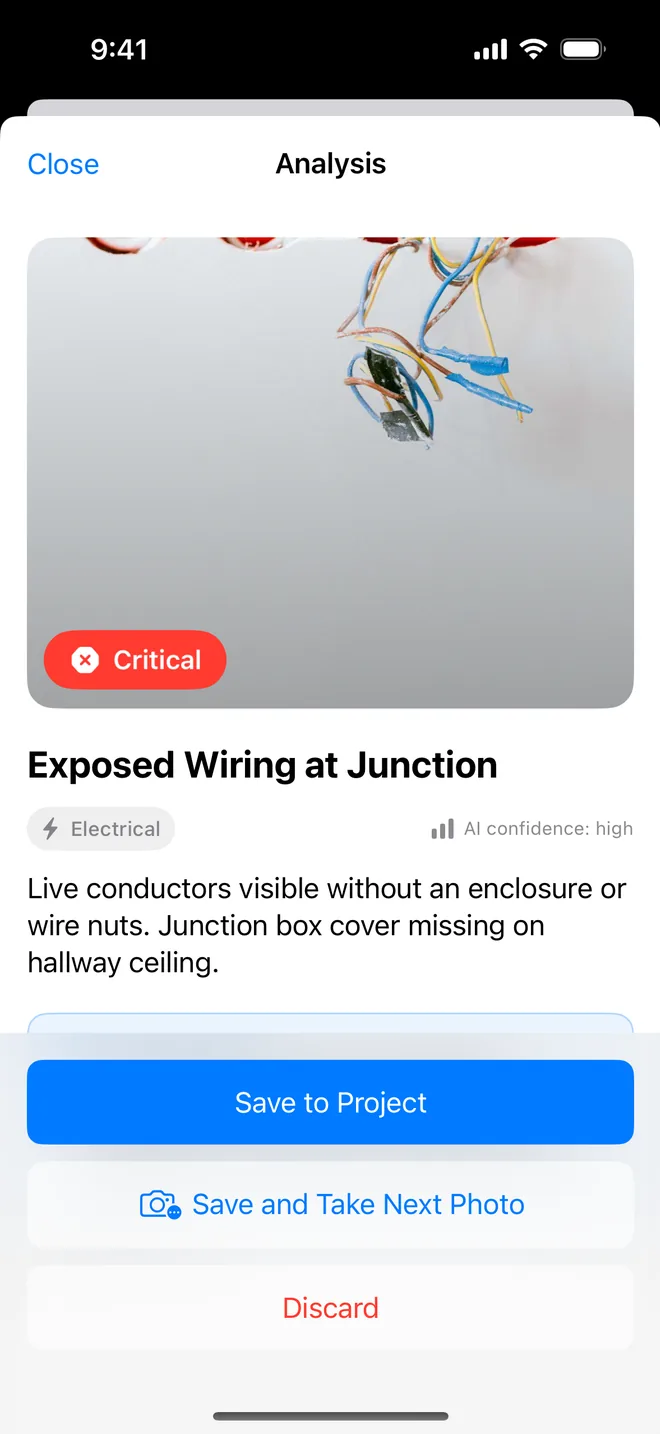
Punch List AI turns a photo into a structured snag: severity, category, a written description and a recommended fix. Build the project, then export a professional PDF report in one tap.
Built for the people who walk the site
- GC superintendents
- Snagging inspectors
- Project engineers
- Clerks of works
- Architects on punch walks
- Property managers
- Home inspectors
- Specialty subcontractors
Three steps between the defect and the report
No templates to configure, no fields to design, no onboarding call. Open the app on site and start.
Photograph the defect
Open the project, hit the camera, shoot what you see. Add more angles to the same issue if one frame does not tell the story.
Let the AI write it up
In a few seconds you get a draft: title, description, category, severity and a recommended action. Read it, edit or rewrite anything you disagree with, then save it to the project. Your words go on the report, not the machine's.
Export the report
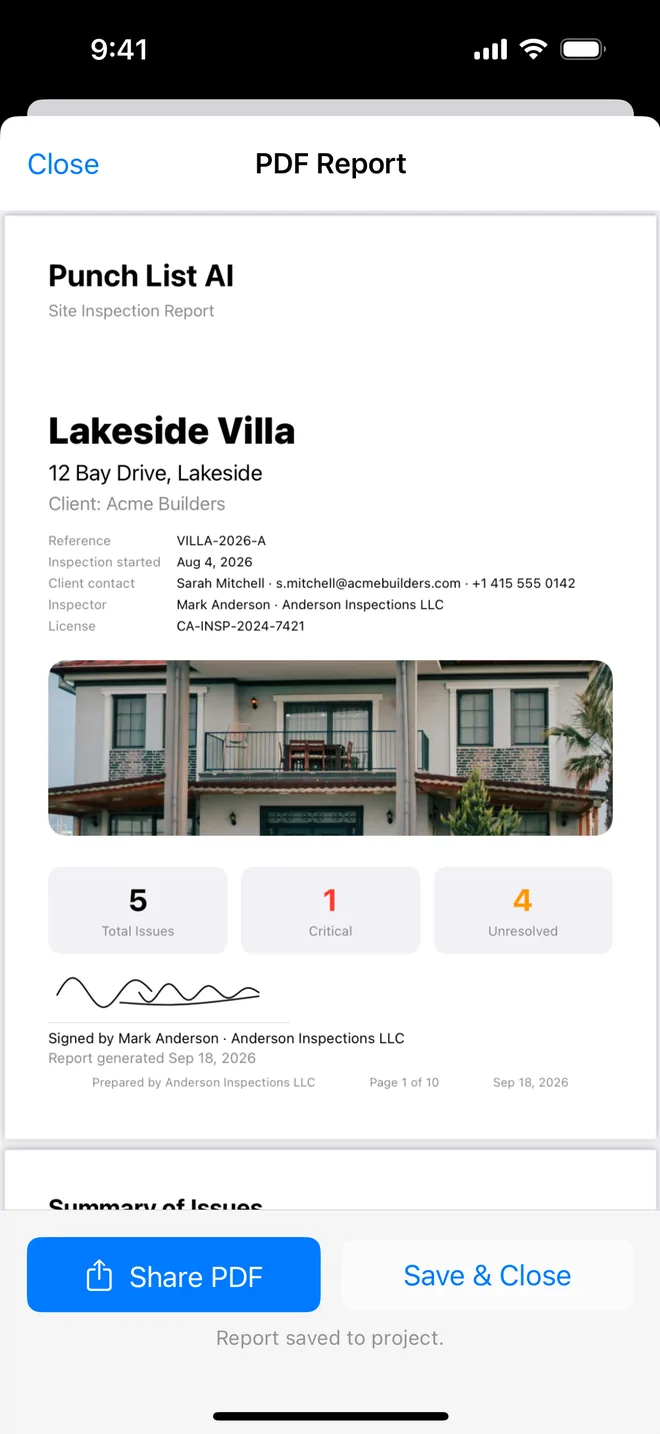
One tap produces a PDF with your cover page, project details and every issue laid out with its photos. Share it by email, AirDrop or straight into your document system.
Your inspections now follow you from iPhone to iPad
Released September 2026. Everything below is included in the free plan.
iCloud sync
Projects, issues, photos, markup and reports sync between your devices through your private iCloud, and come back on their own after a new phone or a reinstall.
A sample inspection to start with
First launch offers a finished six-issue project. Open it, export the PDF, see exactly what your clients would receive: before you have photographed anything.
Reports with the full record
Reference, inspection date, client contact, inspector and licence on the cover; priority, trade, location, due date and tags on every issue. Photo markup prints at the right scale.
Everything a site walk actually needs
Fast enough to use while you are still standing in front of the defect. Complete enough that the report does not need rewriting when you get back to the office.
Photo-first capture
Point, shoot, done. Every other app on the market makes you fill a form before you can record what you are looking at. Here the photo is the input.
AI defect analysis
Title, plain-English description, category, severity from low to critical, a suggested fix and a confidence rating: generated from the image in about two seconds.
Annotate on the photo
Circle the crack, arrow the missing sealant, add a note by hand. Annotations sit on a separate layer, so the original photo is never destroyed.
Real project structure
Projects with client, inspector, reference and start date. Issues with status, priority, trade, location, due date and auto-numbered references.
Reports clients accept
Ten themes, three layouts, your own title and headings, the client's signature on the cover. PDF, Word on Pro, CSV with photos: the report your GC, owner or trades actually work from.
AI Insights
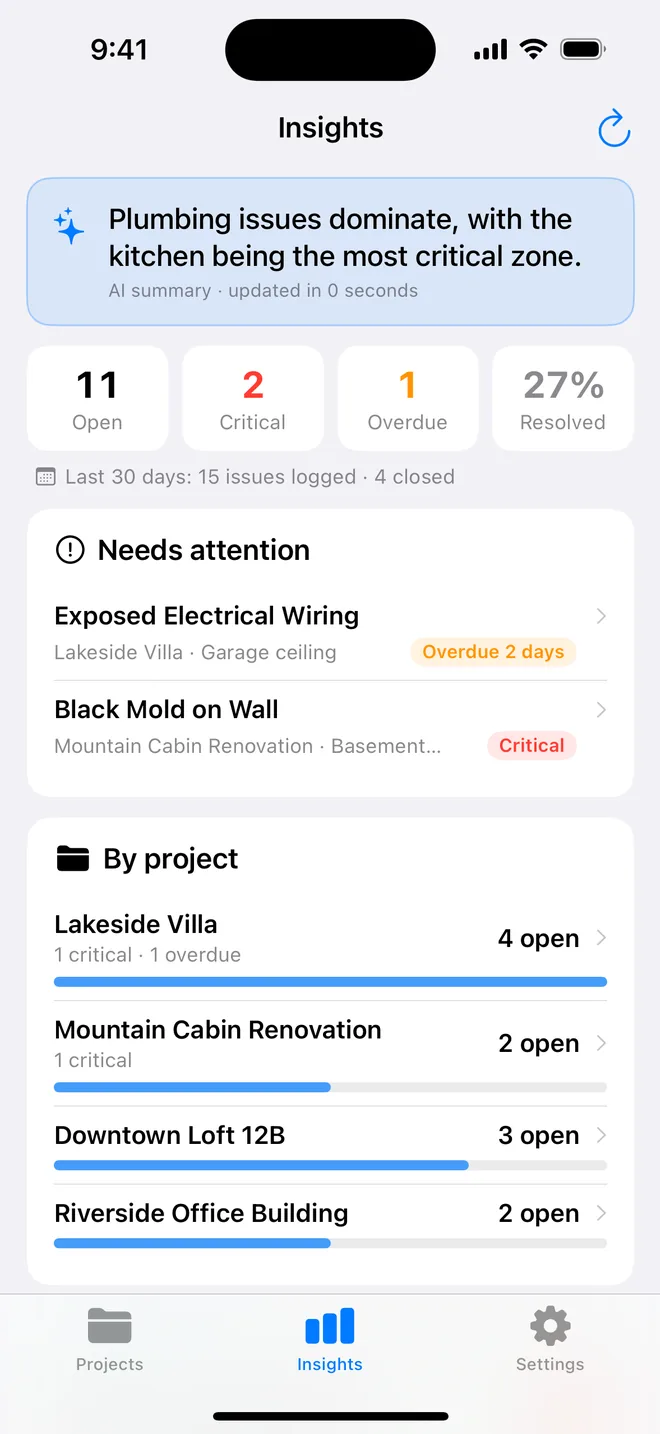
Pattern detection across every project: the trade that keeps generating criticals, the recurring defect, the overdue backlog you had not noticed.
Voice notes on site
Dictate straight into an issue with gloves on and a drill running. Speech-to-text writes into the notes field as you talk.
iCloud sync, iPhone and iPad
Start on the phone on site, finish on the iPad at the desk. Projects, photos and reports sync through your private iCloud and survive a new device or a reinstall.
Your data stays yours
Everything lives on your device and in your own iCloud, never on our servers. No account to create, no sign-up wall, and the camera is optional, every issue can be typed by hand.
Every feature in detail → · 14 checklist templates · Compared with Site Audit Pro and others
The fastest way to record a defect is to photograph it
Every competing app is form-first: pick a project, pick a location, pick a trade, type a title, choose a severity: and only then attach a photo. That is four taps of admin before you have recorded anything.
Punch List AI inverts it. The photograph is the entry. The write-up comes back already structured, and you correct rather than compose.
- Severity graded low, medium, high or critical
- Category assigned automatically: structural, finishes, MEP, safety, envelope
- A remedial recommendation you can hand to a subcontractor
- A confidence rating, so you know when to look closer yourself
The report is the deliverable, so it looks like one
Nobody is paying you for the app. They are paying for the document that lands in the client's inbox. The cover carries the project reference, inspection date, site address, client contact, inspector and licence number. Then one clear block per issue: photos with your markup, severity badge, description, recommendation, status, priority, trade, location, due date and tags.
- Your own company logo and name on the cover (Pro)
- The description and recommendation are the words you approved, nothing on the page is labelled AI
- Auto-generated reference numbers, with manual override
- Shareable by email, AirDrop, Files or any app on your phone
Patterns you would never spot one issue at a time
Once you have run a few inspections, the app reads across all of them: which trade generates the most criticals, which defect keeps reappearing on the same type of build, how much of your list is overdue and where the risk is concentrated right now.
It is the difference between a list of problems and an argument you can take to a meeting.
Free to try properly. $9.99 a month or $59.99 a year if you keep it.
Run a real inspection before you decide. Free to download, no account to create.
Free
Enough to run a genuine small inspection.
- 1 project
- 5 issues, 3 photos each
- AI photo analysis
- Manual issue entry
- Photo annotation
- Voice-to-text notes
- iCloud sync between iPhone and iPad
- 10 report themes, 3 layouts, client sign-off
- PDF (watermarked), CSV, CSV with photos
- Word export
- AI Insights
- Custom logo & branding
Pro
For anyone who inspects for a living.
- Unlimited projects
- Unlimited issues per project
- Up to 100 photos per issue
- Clean PDF, no watermark
- Your company logo and name on reports
- Editable Word reports (.docx)
- AI Insights across all projects
Prices in USD and may vary by App Store region. Subscriptions are billed through your Apple ID and renew automatically unless cancelled at least 24 hours before the end of the period. Cancel any time in iPhone Settings. Nothing is charged during the trial.
The whole app in three minutes
Questions people ask before downloading
What exactly does the AI do?
You photograph a defect and the app sends that single image to a vision model. It comes back with a short title, a plain-English description of what is visible, a category (structural, finishes, MEP, safety and so on), a severity level from low to critical, a suggested remedial action and a confidence rating. Everything it returns is editable: it is a first draft of the item, not a verdict you are stuck with.
How accurate is it?
It is reliable on visible, photographable defects: cracking, damp and staining, poor finishes, missing sealant, damaged fixtures, exposed services, obstructed access. It cannot judge anything it cannot see, loads, hidden services, code compliance or the cause behind a symptom. Treat the output as a well-written first pass by an assistant, then apply your own judgement. Every field is editable before you save.
Can I still add items by hand?
Yes. The form-first path is fully supported, create an issue, type the title, set severity, priority, status, trade, location and due date without touching the camera. The AI is an accelerator, not a gate.
Do I have to use the AI's wording?
No. The analysis comes back as a draft, description and recommendation, that you read, edit or rewrite before it is saved. Only your final text appears on the report, and nothing on the PDF is labelled as AI-generated. Your name is on the document, so the words are yours.
Does it sync between my iPhone and iPad?
Yes. Sign in to iCloud on both and projects, issues, photos, markup and reports sync automatically through the private iCloud database of your Apple ID, included in the free plan, nothing to configure. It also means a new phone or a reinstall does not lose your inspections. Settings shows the sync status.
Does it work offline?
Projects, issues, photos, annotations and PDF generation all work with no signal, which matters on a site with no coverage. The AI analysis step is the one feature that needs a connection: capture your photos offline, run the analysis when you are back in range. iCloud catches up on its own once you are online.
Where is my data stored?
On your device, in a private database, and, if you are signed in to iCloud, in the private iCloud database of your own Apple ID so it syncs between your iPhone and iPad and survives a new phone. We do not run a server that holds your content and cannot read your iCloud data. When you tap Analyse, that photo (with the project name, address and a few recent issue titles as context) goes through our relay to Anthropic's Claude API, which drafts the write-up; the relay keeps nothing and the content is not used to train models.
What is in the free version?
One project with up to five issues and three photos per issue, plus photo capture, AI analysis, manual entry, voice notes, iCloud sync and a watermarked PDF export. A sample inspection is offered on first launch so you can open a finished project and export a report before you have photographed anything. It is enough to run a genuine small inspection end to end and judge whether the output is good enough for your clients before you pay anything.
Turn your next site walk into a finished report
Free to download. Open the sample inspection or analyse your first defect in under a minute. No account, no setup.