
Part of the guide: How Much Does a Snagging Inspection Cost in the UK? (2026 Prices)
The right punch list app is the one your team is still using after the second week. In practice that means an item recorded with its photo in well under a minute, a report you would send under your own name, an export that is not held back behind a paywall, and pricing that fits how you work: per seat for a team, per inspector for a one-person practice. There are dozens of apps and their marketing pages are close to interchangeable, so this guide is about telling them apart in a way that survives contact with a real project.
Disclosure: we make Punch List AI, one of the apps in this market. We have therefore written this as a framework for evaluating any tool rather than a ranked list with ourselves at the top, which you would be right to distrust. Where we mention our own app, it is labelled.
The four categories
Every product in this market sits in one of four groups, and picking the wrong group is a more expensive mistake than picking the wrong product within a group.

| Category | Who it fits | Typical cost shape | Main risk |
|---|---|---|---|
| Solo inspection apps Single user, phone-first, PDF out | Independent inspectors, snagging consultants, small builders, PMs doing their own walks | Low monthly per user, or one-off | Hits a ceiling if you later need team collaboration |
| Team field apps Multi-user, cloud sync, assignment | Contractors with several people punching the same project | Per user per month, mid range | Setup and admin overhead; you pay for seats you do not use |
| Full construction platforms Punch is one module of many | Mid-to-large contractors already standardising on a platform | Annual contract, negotiated | Expensive and heavy if punch lists are all you need |
| Generic tools Spreadsheets, forms apps, notes | Occasional use, very small jobs | Near zero | Photo handling and the transcription gap |
Be honest about which you are. A one-person snagging business buying a platform seat is burning money; a fifteen-person GC running punch lists in a solo app will hit the wall within a project.
What actually matters on site
Ranked by how often they determine whether a tool gets used after week two:
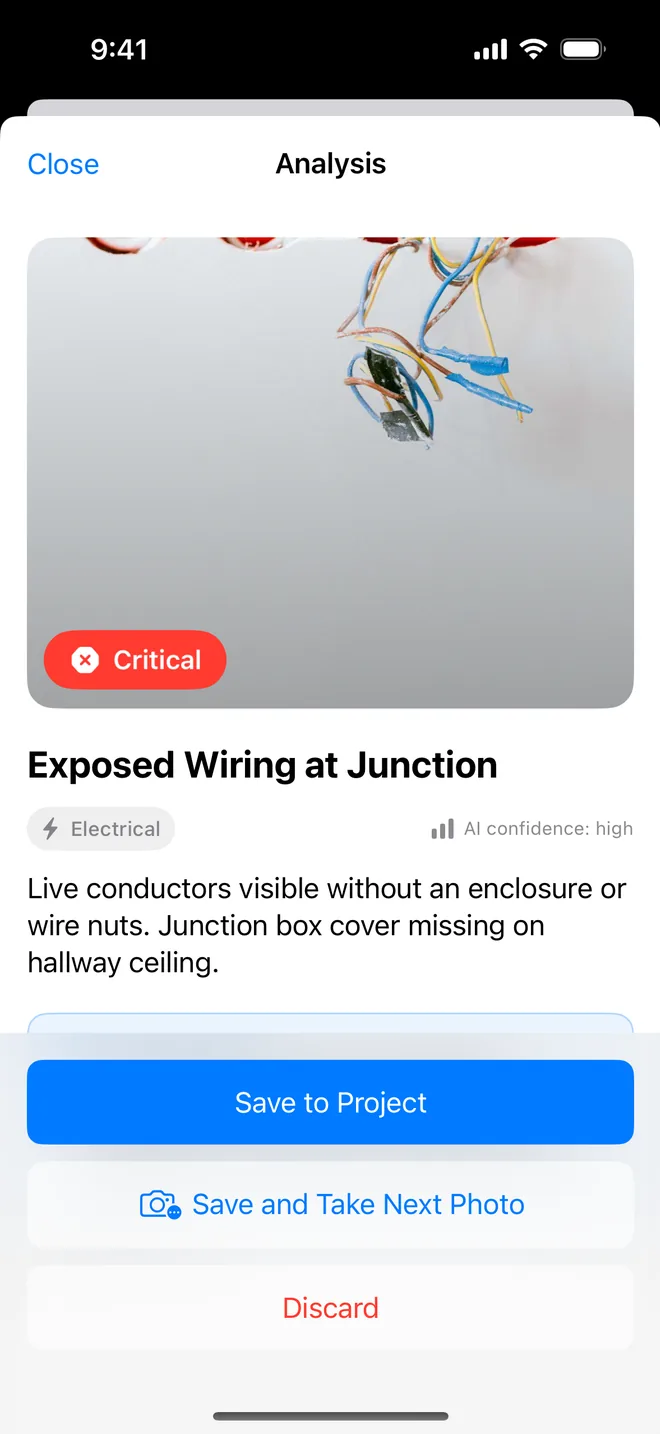
- Speed per item. Time yourself. From "I see the defect" to "the item is saved" should be well under a minute including a photo. Anything slower and people revert to their camera roll, which is the failure mode you are trying to eliminate.
- Offline capture. Basements, plant rooms, stairwells, rural sites. If capture requires signal, the tool fails exactly where you need it.
- PDF output quality. The report is the deliverable. Generate one from real data and look at it before you commit, many apps are pleasant to use and produce a document you would not send a client.
- Photo handling. Multiple photos per item, annotation on the image, and no loss of quality.
- Editability. You will get things wrong on site. Correcting an item should take two taps, not a workflow.
- Export and escape. Can you get your data out? PDF, CSV, images. If the answer is unclear, the answer is no.
- Battery and storage. A tool that eats 40% of your battery over a four-hour walk is not usable.
What demos well and does not matter
Not that these are worthless, they are just rarely the thing that decides whether the tool survives real use:
- Dashboards and analytics, for anyone under about ten concurrent projects. Impressive in a sales call, unopened in month two.
- Unlimited custom form templates. Most people build one and never touch the builder again. Configurability is often a substitute for good defaults.
- Integrations you do not currently use. Never buy for an integration you are not using this quarter.
- Plan pin-drop: genuinely valuable on large commercial projects with reliable drawings, and largely irrelevant on residential snagging where "Apt 3B ensuite" is a better address than a coordinate.
- Roles and permissions, if you are one person.
The seven questions
Ask these of any vendor, including us:
- Where is my data stored, and can I export all of it tomorrow? Get a specific answer about format, not a reassurance.
- What exactly happens offline? "Offline support" covers everything from full capture to a read-only cache.
- Can I see a real generated PDF, from real data, before I pay? If the answer is a marketing mockup, that is informative.
- What is the free tier actually for? A free tier that cannot export anything is a demo, not a trial.
- What happens to my projects if I stop paying? Read-only access, export window, or locked out?
- If AI is involved, what leaves my device, where does it go, and is it used for training? Site photos are frequently confidential.
- How long has this been maintained, and when was the last update? Abandonware in this category is common; check the App Store version history.
Pricing patterns
Rather than quote figures that will be stale within months, here are the shapes and what each one implies:
- Per user, per month. The default for team tools. Watch for a minimum seat count.
- Per project. Rare, but attractive for occasional inspectors. Check what happens to old projects.
- One-off purchase with in-app add-ons. Usually indicates an older product; check maintenance before being attracted by the price.
- Flat subscription, single user. The solo inspector standard. Compare annual against monthly , annual discounts of 30-50% are normal in this category.
- Credit or usage metering on AI features. Worth understanding before you commit; a tool that meters analyses changes how you behave on site, and not for the better.
(Ours: free tier with one project and AI analysis included; Pro at $9.99/month or $59.99/year with a 7-day trial, no metering on AI. Listed here because we asked you to demand specifics.)
How to run a fair trial
A proper trial takes about ninety minutes and settles the question far better than a feature comparison:
- Pick one real area of a live project, one floor, one apartment, one unit.
- Inspect it fully in the app, on your own phone, with your own hands, on site. Not at a desk.
- Time it. Note the total, and the per-item average.
- Generate the report and send it to yourself. Open it on a laptop. Would you send that to a client under your own name?
- Try to fix a mistake you deliberately made. Count the taps.
- Turn off mobile data and repeat five items.
- Export everything and confirm you can open it outside the app.
Do that with two candidates and the decision usually makes itself. Feature matrices almost never do.
Run that ninety-minute trial on us
The free tier gives you a full project with AI analysis and a PDF export, enough to complete the test above end to end without paying anything.
Get the free appQuestions people ask
Is there a free punch list app?
Most apps have a free tier that is enough to try a real inspection. Check what the free tier limits: number of projects, photos per item, and whether the exported report carries a watermark. Ours is one project, five items and a watermarked PDF, which is deliberately enough to judge it.
What features actually matter in a punch list app?
Photo capture that attaches to the item in one motion, a report the client can open without an account, and offline capture. Dashboards, chat and integrations demo well and are rarely used by someone standing on a site.
Do I need a team plan for a solo inspection business?
Usually not. Solo inspectors need speed on site and a clean deliverable; team features are worth paying for when someone else has to update the same list. Start solo, upgrade when the second person appears.