The short version
Site Audit Pro wins on: ten years of ratings, the one-off price, Android and a web app, eight report designs with custom colours and text size, free-text wording for headings.
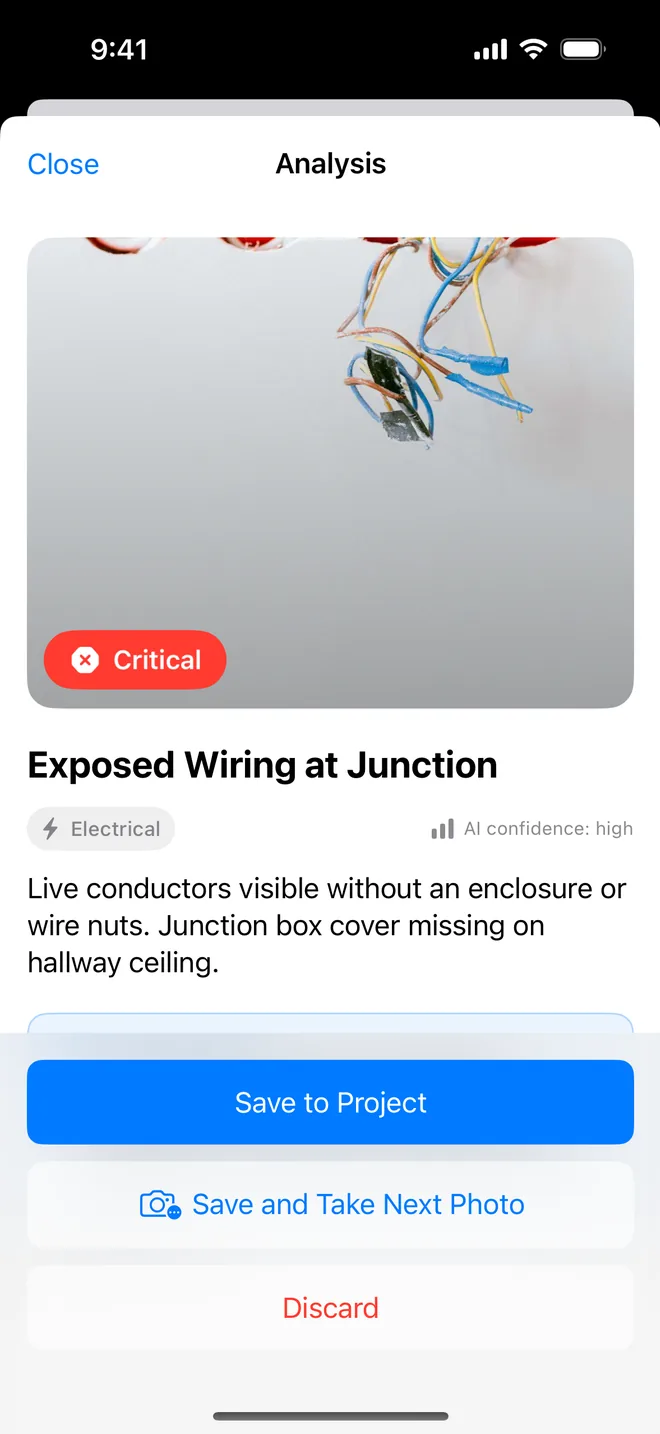
Punch List AI wins on: the AI draft from the photo and the AI read of before/after (nobody in the niche has either), free iCloud sync and several photos per item (Site Audit Pro's two most-resented Cloud paywalls), room-by-room checklists with custom templates, closure evidence printed Before/After, structured fields (severity, trade, priority, status, reference, tags), search, filters and folders, CSV with a photo zip, voice notes, Insights, iPad split view, full dark mode, and a free tier you can finish a small job with.
At parity, free: GPS and timestamp on photos, signature on the report, multi-add, bulk edit, assignee, photo markup, offline use, no account.
Price and model
| Feature | Site Audit Pro | Punch List AI |
|---|---|---|
| Entry price | £12.90 one-off, iOS and Android bought separately | Free, no account |
| Subscription | Cloud: £6.99/mo or £59.99/yr, per device | Pro: $9.99/mo or $59.99/yr, per Apple ID, every device |
| Free trial | None: the £12.90 is the trial | 7 days |
| What the base tier does | Everything offline; 1 photo per issue; no sync, due dates or 'complete' | 1 project, 5 items, 3 photos each; AI, checklists, closure, signature, watermarked PDF, CSV, iCloud sync |
| Platforms | iOS, Android, web (Cloud) | iOS and iPadOS |
| Ratings | 4.83 ★ / 11,225, ten years | New, 4 months on the store |
Site Audit Pro's "I paid once" is real and emotional. The catch is that sync, several photos per item, due dates and marking an item complete are in Cloud, billed per device. Punch List AI keeps all of those free and charges once per Apple ID for the professional layer: unlimited projects, no watermark, your logo, Insights.
Capture
| Feature | Site Audit Pro | Punch List AI |
|---|---|---|
| Photo → item | ✓ manual: photo, title, comment | ✓ AI draft: title, description, trade, severity, fix, confidence |
| Several photos per item | ◐ Cloud (base = 1) | ✓ 3 free / 100 Pro |
| Import several images → several items | ✓ Multi-add | ✓ and each is AI-drafted in turn |
| Save and add another on the walk | ✓ | ✓ Save and Take Next Photo |
| Photo markup | ✓ pen, circle, arrow | ✓ separate layer, original kept |
| Voice notes | ✕ | ✓ |
| Assignee on the item | ✓ | ✓ with the project's previous assignees as chips |
| Remember last location / assignee | ✕ | ✓ |
| Due date | ◐ Cloud | ✓ free |
| Status | ◐ Cloud ('complete') | ✓ 5 statuses, free |
| Severity / trade / priority | ✕ | ✓ AI-suggested severity and trade |
| Reference numbers, tags, location field | ◐ location in comment | ✓ |
| GPS + timestamp on photos, printed | ✓ headline feature | ✓ camera and imported EXIF, toggle, on PDF and CSV |
| Room-by-room checklists | ✕ | ✓ 4 built-in walks, custom templates, share as file |
| Closure evidence (after photo, verified by) | ✕ | ✓ Before/After on the PDF |
| AI comparison of before and after | ✕ | ✓ |
Organisation
| Feature | Site Audit Pro | Punch List AI |
|---|---|---|
| Project details (client, site, reference, cover photo) | ◐ address and cover are Cloud | ✓ plus inspector, licence, client contact |
| Project folders | ◐ Cloud | ✓ free |
| Duplicate project | ✕ | ✓ |
| Search items | ✕ | ✓ |
| Filter by status / severity / trade / assignee / overdue | ✕ | ✓ |
| Multi-select and bulk edit | ✓ Multi-edit | ✓ status, priority, delete |
| Cross-project analytics | ✕ | ✓ Insights (Pro) |
| Sync between devices | ◐ Cloud, per device | ✓ free, iCloud |
| iPad layout | ◐ | ✓ split view, keyboard shortcuts |
| Web app | ◐ Cloud | ✕ |
| Team / shared projects | ✕ | ✕ |
| Offline | ✓ | ✓ AI needs a connection |
| Account required | ✕ yes for Cloud | ✕ |
Report
| Feature | Site Audit Pro | Punch List AI |
|---|---|---|
| ✓ | ✓ | |
| CSV | ✓ images as zip optional | ✓ and CSV + Photos zip, photos named after their row |
| XLSX | ✕ | ✕ CSV opens in Excel |
| Report themes | ✓ 8 designs, custom colours (extras in Cloud) | ✓ 10 themes, 3 layouts |
| Toggle sections (photos, cover, notes, appendix, page numbers) | ✓ | ✓ |
| Photo size control | ✓ | ✓ Large / Medium |
| Text size control | ✓ | ✕ |
| Company logo and name | ✓ base | ✓ Pro |
| Signature on the report | ✓ base | ✓ free |
| Custom wording (Issue → Snag / Defect / Deficiency) | ✓ free text | ◐ 6 preset terms |
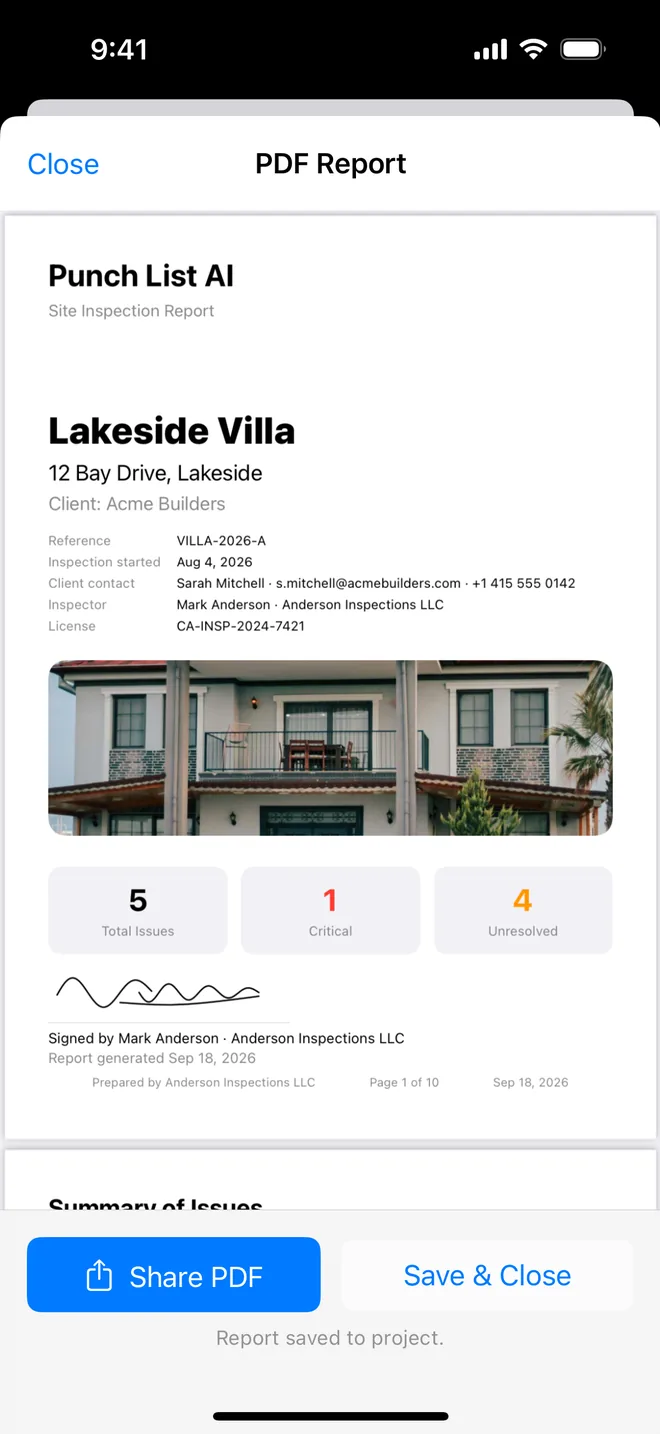
| Cover: reference, dates, client, inspector, licence, signature | ◐ | ✓ |
| Summary table with trade, assignee, location, due date | ✕ | ✓ overdue in red |
| Before / After side by side | ✕ | ✓ |
| Checklist appendix | ✕ | ✓ |
| Full-screen preview before sharing | ◐ | ✓ |
| Email to client, pre-addressed, PDF attached | ◐ share sheet | ✓ |
| Watermark on the free tier | ✕ paid app | ✓ removed by Pro |
On the report screen Site Audit Pro keeps a text-size control and custom colours. Since version 1.3 Punch List AI has ten themes and three layouts (Standard, Compact, and a Schedule grouped by contractor), its own title, headings, introduction and closing remarks, and a client sign-off on the cover. Its report also carries a summary table with trade, assignee, location and due dates, Before/After pages for closed items and a checklist appendix, and Pro adds a Word export.
Trust and polish
| Site Audit Pro | Punch List AI | |
|---|---|---|
| Track record | 10 years, 11,225 ratings | 4 months; 512 automated tests run before every release |
| Review prompt | Reviews complain it appears after every survey (recently changed) | After 2 exports and 3 days, once per version |
| Support | Online help centre and email | Email; a person answers, usually the same day; guide and troubleshooting in the app |
| Where your data lives | Device; Cloud projects on their server | Device and your own iCloud; AI through an attested relay that keeps nothing |
| Dark mode | Dark chrome | Full |
| First launch | Empty list | A sample project to explore |
Questions
Is Punch List AI a replacement for Site Audit Pro?
For a solo inspector on iPhone or iPad, yes, every field capability Site Audit Pro is known for (GPS on photos, signature, CSV, multi-add, bulk edit, assignee) is in Punch List AI, plus the AI draft, checklists and closure evidence it does not have. If you need Android, a web app or eight report designs, Site Audit Pro still wins.
Which is cheaper?
Site Audit Pro is £12.90 once per platform, then £6.99 a month per device for Cloud (sync, several photos, due dates). Punch List AI is free to try and finish a small job; Pro is $9.99 a month or $59.99 a year for every device on your Apple ID. Over a year with sync on two devices, Punch List AI Pro costs less.
Can I move my projects from Site Audit Pro?
There is no direct import. Export CSV from Site Audit Pro for your records; new projects start in Punch List AI. Most inspectors switch at the next job rather than migrating history.
Where did these facts come from?
Site Audit Pro's App Store listing (version 10.7.2), its screenshots and siteauditpro.com/pricing, checked on 18 September 2026. Punch List AI as of version 1.2. If we got something wrong, email us and we will fix it the same day.
Try the AI draft on your next walk
Free to download; the first project is free for good. Pro is a 7-day trial, cancelled in one tap.
Download on theApp Store